
Grist is a tool that sits somewhere between a spreadsheet, a small database and a lightweight internal tool.
The project describes Grist as a relational spreadsheet, and it is available here: getgrist.com.
I use it on my home server for structured information that needs more than a normal note or spreadsheet, but does not need to become a custom application.
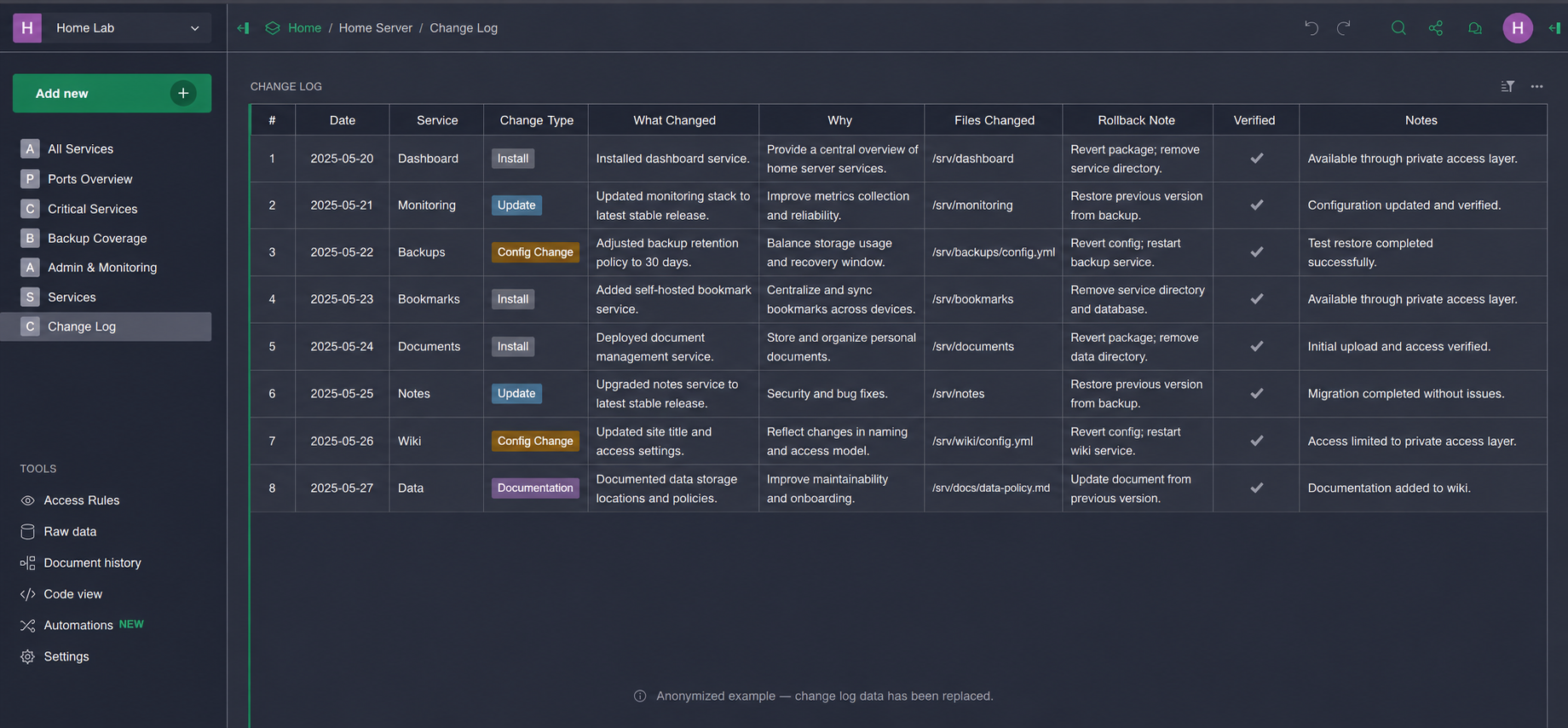
That is where Grist makes sense to me.
What I use it for
- Service inventory.
- Simple changelogs.
- Small operational lists.
- Structured notes about tools and systems.
- Tables where relationships matter more than in a normal spreadsheet.
A spreadsheet is often the fastest way to start organizing something. But after a while, some spreadsheets become awkward. Columns start doing too many things. Notes get mixed with status fields. Related information is repeated in different places.
Grist helps when information needs structure, relationships and views, but still needs to stay easy to read and update.
What makes it different from a spreadsheet
The useful part of Grist is that the same data can be shown in different ways.
A table can be used for editing records. A card view can show the details of one selected record. A summary view can group information. A filtered view can show only the records that matter for a specific use case.
That means one document can start to feel like a small internal tool instead of just a flat table.
For example, a service inventory can have one view for all services, another for critical services, another for backup coverage, and another for changelog entries. The data is connected, but the views can stay focused.
Widgets and layouts
Grist also supports page widgets, which makes the tool more flexible than a normal spreadsheet.
You can place different widgets on a page, such as tables, cards, card lists and charts. Widgets can also be linked, so selecting a row in one table can show related details somewhere else on the page.
That is useful when the data needs a bit of context.
For a simple CRM, one widget could show companies, another could show contacts, and another could show follow-up notes. For a home server inventory, one widget could show services, while another shows details, backup status or related changelog entries.
The layout does not have to be complicated. Even a table next to a detail card can make data much easier to work with.
Other useful examples
Grist can work well for many lightweight systems.
- A simple CRM for contacts, companies, notes and follow-ups.
- A content calendar for articles, ideas, drafts and publishing status.
- A small asset register for hardware, devices, warranties or subscriptions.
- A project tracker for tasks, owners, status and decisions.
- A QA register for checks, issues, evidence and sign-off notes.
- An automation control table where workflows can read or update status.
It is not only for small lists. It can support more serious workflows too, as long as the structure stays understandable.
Where it gets more useful
Grist becomes more interesting when it is not only updated manually.
Because the data is structured, it can be connected to other tools and small automations. For example, a workflow in n8n can update a table, add a changelog entry, or keep a service inventory in sync with information from another place.
That makes Grist useful as a lightweight data layer for small internal workflows.
I like that because it keeps things visible. The data is still readable in a table, but it can also be updated by automation when that makes sense.
What I would keep simple
I would not try to turn Grist into a replacement for every spreadsheet or every app.
It works best when the use case is clear. A service inventory. A changelog. A lightweight CRM. A small tracker. A table that needs filtering, views and a few relationships.
If the structure becomes too clever, it can become harder to maintain than the thing it replaced.
A few practical tips
- Start with one clear use case.
- Use clear field names that still make sense later.
- Keep status values simple and consistent.
- Use views for different needs instead of duplicating data.
- Use card widgets when a row needs more detail.
- Use linked widgets when records relate to each other.
- Use automation for small updates, but keep the table readable for humans.
- Do not over-model the data before you know how you will use it.
What to be careful with
Structured lists can reveal more than expected.
A service inventory, CRM-style list, changelog or internal tracker can include names, relationships, access notes, operational details and other useful context. That is exactly what makes it helpful, but it also means it should be treated as part of the system rather than a random spreadsheet.
I would also keep an eye on complexity. Grist is flexible, and that flexibility can tempt you to make a small tracker too advanced.
Verdict
Grist is a good fit for structured information that needs more than a spreadsheet, but less than a custom app.
For me, it is especially useful for server inventory and changelog-style records. But the same idea can work for simple CRM, content planning, QA registers, asset lists and small operational workflows.
The combination of tables, views, widgets and automation makes it feel less like a document and more like a small tool.
That makes it a very practical service on a home server.
This note is part of a small series about self-hosted tools I use on a home server.